Demo Mode
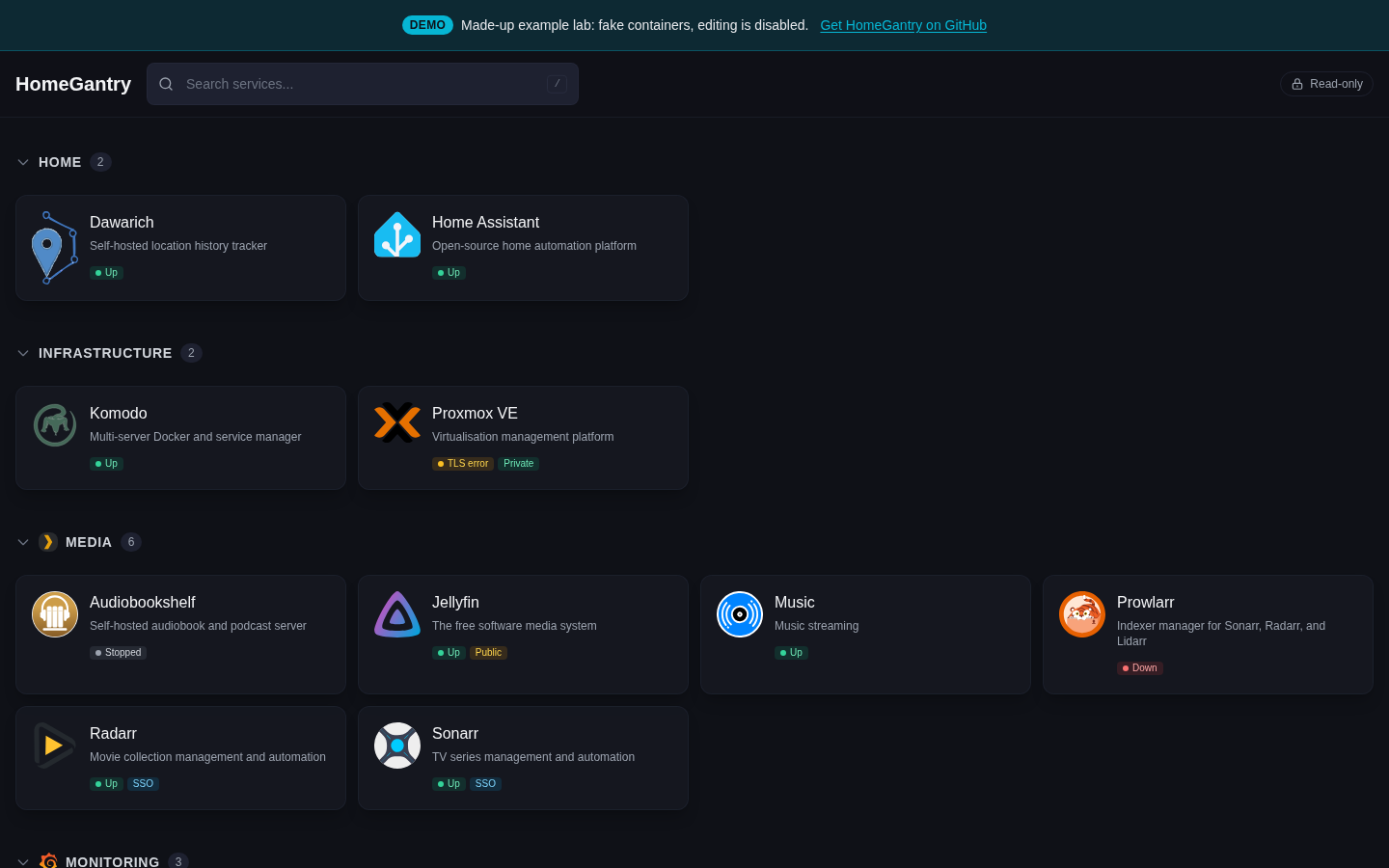
Demo mode shows a made-up homelab: about 30 services in several stacks and categories, Traefik routers with every exposure badge (public, SSO, private, unknown), every health state (up, down, timeout, TLS error, not checked), a stopped container and a few manual services. It needs no Docker socket and no Traefik, and it is safe to put on the internet.
Try it
docker run --rm -p 3000:3000 -e HOMEGANTRY_DEMO=true ghcr.io/geraldvd/homegantry:latestor with the example Compose file:
curl -O https://raw.githubusercontent.com/geraldvd/homegantry/main/examples/compose.demo.yaml
docker compose -f compose.demo.yaml up -d
Then open http://localhost:3000. Demo mode is in every release from 0.3.0.
From a clone of the repository, npm run build && HOMEGANTRY_DEMO=true npm start does the same.
What demo mode does
| Normally | In demo mode |
|---|---|
| Reads containers from the Docker socket or socket proxy | Lists the example lab from memory. No Docker client is created, the socket and DOCKER_HOST are ignored. |
Reads the Traefik API (HOMEGANTRY_TRAEFIK_API_URL) | Uses the example lab's Traefik routers from memory. The API URL is ignored. |
| Sends HTTP health checks to your services | Shows a fixed result per service and sends no request. |
| Read-only unless you enable editing | Always read-only: HOMEGANTRY_ADMIN_TOKEN, HOMEGANTRY_AUTH_HEADER and HOMEGANTRY_READONLY are ignored. |
Stores overrides and settings in /data | Keeps everything in memory; nothing is read from or written to the data directory. |
A Demo banner at the top links to the repository. The example lab uses only example.com host names and 192.168.1.x addresses; it is the same data as the tests and npm run dev:fixture (server/demo/).
The visitor's browser still loads service icons from the icon CDN; set HOMEGANTRY_ICON_SOURCE=off for letter avatars without any external request. Other settings that still apply: HOMEGANTRY_TITLE, HOMEGANTRY_PORT, HOMEGANTRY_HOST (default 192.168.1.100 in demo mode), HOMEGANTRY_SHOW_STOPPED (default true in demo mode) and HOMEGANTRY_TRUSTED_PROXIES (so rate limits use the real client IP behind a proxy).
Hosting a public demo
The demo has nothing to protect, but it is still a web server on the internet:
Run it on its own. Use a separate container (as in
examples/compose.demo.yaml), never a real HomeGantry instance withHOMEGANTRY_DEMOadded: the demo ignores the socket, but there is no reason to mount it.Lock the container down. The example file runs it as the
nodeuser with a read-only root file system, no capabilities,no-new-privilegesand no volumes. Demo mode writes nothing, so none of this gets in its way.Put a reverse proxy with TLS in front and set
HOMEGANTRY_TRUSTED_PROXIESto the proxy's IP, so the per-client rate limits see real client addresses. Do not publish port 3000 directly when a proxy is used. With Traefik:yamlservices: homegantry-demo: image: ghcr.io/geraldvd/homegantry:latest environment: HOMEGANTRY_DEMO: 'true' HOMEGANTRY_TRUSTED_PROXIES: 172.20.0.2/32 # the proxy's fixed IP user: node read_only: true cap_drop: [ALL] security_opt: [no-new-privileges:true] networks: [proxy] labels: - traefik.enable=true - traefik.http.routers.demo.rule=Host(`demo.example.com`) - traefik.http.routers.demo.tls.certresolver=le - traefik.http.services.demo.loadbalancer.server.port=3000 networks: proxy: external: trueRead-only is enforced by HomeGantry itself, so the proxy does not need to block
PUT/POST/PATCH/DELETE; doing so anyway (for example with a method allow-list) does no harm.Pin a version (
0.3) if the demo should only change when you choose.
See the security model for what demo mode guarantees.